Less repetitive work.
More room for the work
that needs people.
Tasking Studio helps connect tools, communication and recurring processes so your team can spend less time moving information around and more time on work that actually needs their attention.
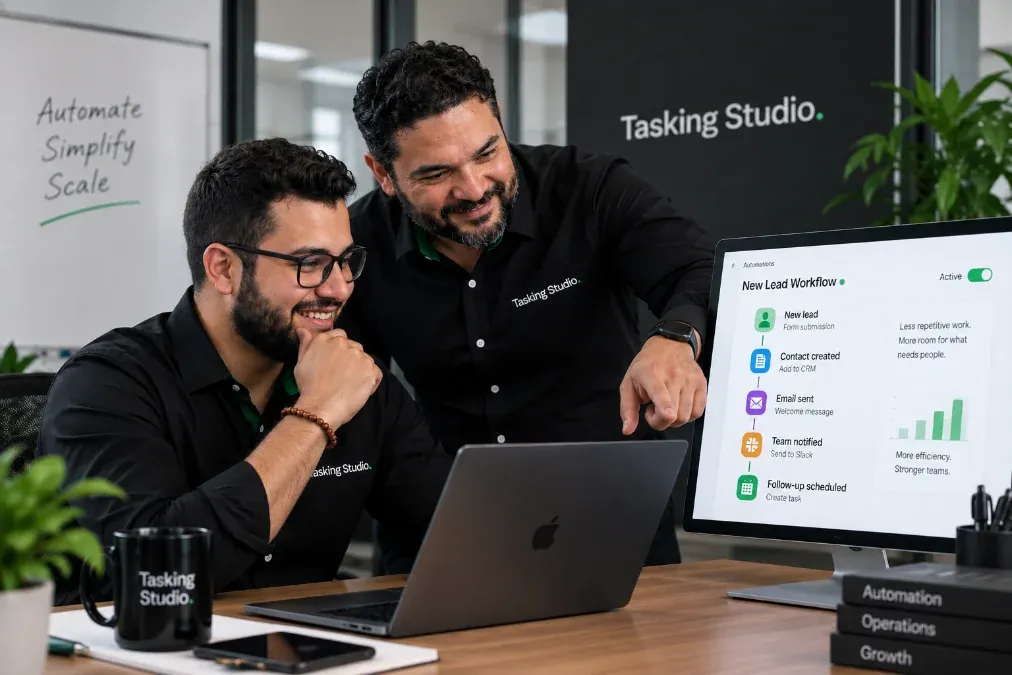
How many things does your team do the same way every day?
When those steps depend entirely on someone remembering to do them, work gets slower, inconsistent and easier to miss.
Repetition is usually a clue.
Automation should support people, not make the business feel less human.
The goal is not to automate every interaction.
The goal is to identify predictable steps that technology can handle reliably, while keeping people involved where judgment, creativity, conversation or personal attention matters.
Let systems handle predictable steps.
Let people handle the human ones.
Connect the steps
that keep your business moving.
We look at the process first, then determine which tools, workflows and automations can make it easier to manage.
Lead Capture & Follow-Up
Make sure inquiries move to the right place and receive the appropriate next step.
CRM Workflows
Keep customer and lead information organized as people move through different stages of the business.
Email Automation
Send useful communication based on what customers do, where they are in a process or what happens next.
Messaging Automation
Use messaging channels to answer predictable questions, guide people toward the right information and support lead capture.
Messaging automation should always make it easy for the customer to reach a real person when necessary.
Tool Integrations
Connect the systems your business already uses so information can move between them without unnecessary manual steps.
The goal is not more tools. It's getting the tools you already need to work better together.
Internal Notifications & Tasks
Make sure the right person knows when something needs attention.
Operational Workflows
Create repeatable processes for work that happens regularly across the business.
A good workflow makes the next step obvious.
Understand the workflow before automating it.
We look at how the process currently works, who is involved and where time is being spent.
We map the steps, decisions, tools and handoffs involved in the process.
Before automating a process, we identify unnecessary complexity and opportunities to make the workflow clearer.
We connect the appropriate tools and create the automation logic.
We define when a person should review, respond, decide or take over.
We test different scenarios and make sure information is moving where it should.
We refine the workflow as the business learns how it performs in everyday use.
A bad process automated is still a bad process.
Understand first. Automate second.
Same business.
Less manual coordination.
Automation removes unnecessary steps around the human work.
Different processes.
Different workflows.
“Leads come in, but follow-up isn't consistent.”
Every new inquiry enters a consistent process without relying on someone to manually move each step forward.
“People message us on social media asking the same questions.”
Common questions can move faster while real conversations still reach the team.
“Every new customer requires the same series of emails, requests and internal tasks.”
The onboarding experience becomes more consistent for both the customer and the team.
“We're generating leads, but what happens afterward is disconnected.”
Marketing connects directly to the process responsible for turning attention into a real conversation.
“Our content process involves too many manual reminders and handoffs.”
The process becomes easier to track without people repeatedly asking what happens next.
A lead isn't the end
of a marketing campaign.
When someone responds to a campaign, automation can help connect that action with email, CRM, internal follow-up and the next stage of the customer journey.
Explore Marketing & Campaigns →People shouldn't have to
wonder what happens next.
Confirmations, reminders, updates and follow-ups can make a customer experience feel organized and responsive — even when the team is busy.
“You got our message.”
“Here's what's coming up.”
“Here's what we need from you.”
“Still interested?”
“Here's where things stand.”
Consistency can feel human too.
We use the tools
that make sense for the workflow.
Tasking Studio can work with automation, CRM, email, messaging and productivity platforms based on what the business already uses and what the process requires.
The technology is not the strategy.
The process comes first.
Not every decision
belongs in a workflow.
Automation works best when responsibilities are clear. Some steps should happen automatically. Others should pause and wait for a person.
Automate the predictable.
Escalate the important.
You may not need
a whole new system.
Sometimes the opportunity is not replacing everything. It's connecting what already exists, simplifying the workflow or filling the gaps between tools.
Make existing tools communicate.
Simplify a workflow that's already working.
Create a new process when the current one isn't enough.
Use what works. Improve what doesn't.
Automation starts
with understanding people.
Building a useful workflow means understanding the people who use it, the customers who interact with it and the business goal behind it.



One workflow
or an ongoing operation.
Identify and improve one repetitive workflow.
Build the follow-up and automation around an existing marketing effort.
Review several recurring processes across the business.
Maintain, adjust and expand workflows as the business changes.
Start with the process that's causing the most friction.
The best automation
doesn't make work feel robotic.
It makes the process feel clearer, faster and easier for the people using it.
Connect the process.
Reduce the repetition.
Keep people where they matter.
What does your team
keep doing manually?
Show us the repetitive process, the disconnected tools or the follow-up that's difficult to manage. We'll help determine what can be simplified, connected or automated.